


Official MN State Fair App
3.943.00 Reviews
App Specs
- Version
- 3.0.4
- Updated On
- License
- Free
- Downloads
- 50,000+
- Developer
- Official Minnesota State Fair App
- Categories
- Events
- Platform
- Android
Screenshots

 Analysis by AppCompare
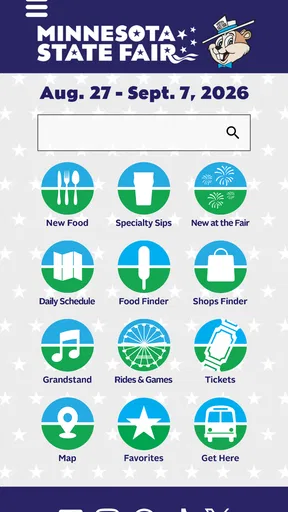
Planning a visit to the Minnesota State Fair can become surprisingly complicated once you start balancing food stops, shopping, entertainment, and the simple question of where to go next. The Official MN State Fair App is designed as a free events app from Official Minnesota State Fair App, and I found its main value in putting fair-related information into one place instead of making me jump between searches, notes, and printed material. It is not an app I would keep open every day of the year, but during fair planning it can turn a loose list of ideas into a more manageable visit.
The app is available for everyone and runs on Android from version 6.0 onward. Its current version is 3.0.4, and it has passed the fifty-thousand-install mark. Those details matter because this is a practical companion rather than a demanding entertainment app: compatibility is broad, the price is free, and the audience includes families, first-time visitors, regular fairgoers, and people who simply want to decide what to eat or see without carrying a separate plan.
Where the visit-planning experience usually gets stuck
The first hurdle is not necessarily installing the app. It is knowing how to use it without expecting it to make every decision for you. A large fair offers too many possible stops for a single screen or menu to solve the whole day. I get better results when I treat the app as a planning and reference tool, not as an automatic itinerary builder.
I begin with one purpose at a time. For example, I may look for food first, then entertainment, then shops. This keeps browsing from turning into an endless scroll through possibilities. If I try to plan breakfast, snacks, performances, shopping, and a meeting point all at once, the useful information becomes harder to organize mentally.
Another common sticking point is confusing discovery with navigation. Finding a food stand or an entertainment option in the app does not automatically mean I know the best walking route, the distance from my current position, or how long the trip will take. I use the app to choose destinations, then leave room for the realities of a crowded fairground: slow walking, queues, detours, and the need to stop for someone in the group.
The most useful habit is to create a short priority list before arriving. I choose a few must-see items and several flexible options. That approach prevents the app from becoming a source of decision fatigue. If a queue is too long or a group member changes plans, I can move to the next option instead of reopening every section and starting over.
The app also makes more sense when each person in a group has a clear role. One person can check food choices, another can look through entertainment, and a third can keep track of the agreed meeting point in a phone note. This is more reliable than having everyone search independently and then discovering that the group has selected destinations scattered across the grounds.
Worth Reading Before You Choose

EA SPORTS FC Mobile 26 Is a Bigger Football Game, but It Takes Time

Flipboard Shows What News Apps Must Do Beyond the Feed

Switching to Android Auto Means Rethinking Your Driving Routine

Google Calendar Makes a Crowded Week Easier to Manage

Ludo King Makes the Most of the Minutes Between Plans

Baby Panda World Brings Quick Play to Modern Phones, but Its Game Library Feels Busy
Why browsing categories works better than random searching
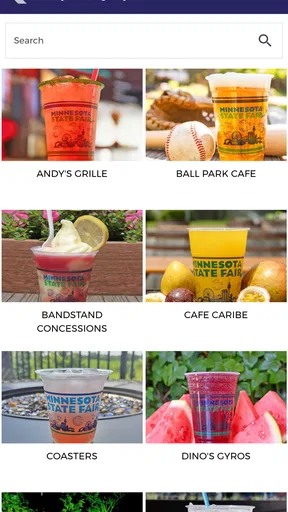
The category focus is one of the app’s strengths. Food, drinks, shops, and entertainment represent different kinds of decisions, and separating them helps me compare options according to what I actually need. A family looking for a quick meal uses the information differently from a visitor hunting for a particular performance or browsing gifts.
I recommend reviewing choices before the busiest part of the day. Early planning gives me time to notice alternatives rather than choosing the first appealing item under pressure. It also exposes a trade-off: the app can help me remember more possibilities, but more possibilities do not always produce a better day. A short list is often more useful than a complete tour of every category.
Setup checks that prevent avoidable frustration
Installation is straightforward because the app is free, but I still treat setup as part of the visit plan. I install it before leaving home, open it once, and browse the sections I expect to use. This catches basic problems while I still have time to fix them instead of discovering them in a crowded environment with a low battery or weak connection.
I also check that the app opens normally after installation and that the content I care about is visible. If a page takes time to appear, I give it a moment rather than repeatedly tapping the same control. Repeated taps can make it difficult to tell whether the app is slow, whether a selection registered, or whether the screen has simply not refreshed yet.
Because the app is an event companion, I avoid assuming that it replaces every other phone tool. I keep my usual map, messaging, and calendar options available. The fair app is best at helping me decide what belongs on my visit list; other phone functions may still be better for coordinating with friends, arranging a meeting time, or handling general travel.
Battery preparation is another small but important check. Browsing event information, checking messages, and using a phone throughout a full outing can all compete for power. I start with a charged phone and carry a backup charging option when possible. That is not a criticism of this particular app; it is a realistic precaution for using any digital guide during a long day away from home.
I also make the plan readable for the whole group. Instead of relying on one person to remember every selection, I share the key choices through an ordinary message or note. This creates a useful backup if the phone running the app is misplaced, handed to a child, or temporarily unavailable.
What to do when information feels difficult to use
If I cannot find what I want immediately, I first return to the main browsing area and try a different category rather than assuming the app is broken. A food-related choice may be easier to locate through the food section than through a general search path, while entertainment planning may require a different browsing approach.
I keep the app updated through the normal app-store process when an update is offered. The listed version is 3.0.4, so checking the installed version can help separate a setup issue from a problem caused by using an older build. I do not update at the last second if I can avoid it; I prefer to open the refreshed app at home and confirm that it still behaves as expected.
For Android users, the minimum operating-system requirement is Android 6.0. That covers a wide range of devices, although an older phone can still feel slower than a newer one. If the app opens but responds sluggishly, I close other demanding apps, restart the phone, and try again. These are simple steps, but they are more sensible than immediately deleting the app and losing the planning work already done.
Recovering when the workflow breaks
My preferred recovery method is deliberately simple: stop, return to the main screen, and rebuild only the next decision. If I was browsing several categories and lost track of where I was, I do not try to reconstruct the entire session. I decide whether the next need is food, drinks, shopping, or entertainment, then continue from there.
This works especially well for families. Suppose one child needs a break while another person wants to continue exploring. I can pause the original plan, choose one nearby-sounding destination from the relevant category, and postpone the rest. The app supports this flexible style better than a rigid schedule because the fair experience naturally changes throughout the day.
I also write down important selections outside the app. This is one of the less obvious but most practical improvements I made. A short note containing a few preferred stops, a backup choice, and a meeting instruction means I do not have to depend on a perfect browsing session later. It also lets someone else in the group help without needing to learn the entire app.
When a screen does not load as expected, I check the basics in order. I confirm that the phone still has a working connection, close and reopen the app, and try the same area again. If the problem continues, I restart the phone and check whether other apps are also having trouble. I avoid repeatedly changing several device settings at once, because that makes it harder to identify what helped.
If the app seems frozen after a tap, I wait briefly before trying another action. Event apps can involve a lot of content, and fast repeated input is not always helpful. If I eventually need to reinstall, I first copy any personal planning notes elsewhere. The app is free, but reinstalling should be a last practical step rather than the first reaction to a temporary loading problem.
A realistic day using the app
Imagine I am visiting with two friends who want different things. Before leaving, I browse food and drinks to identify a shared meal idea, then check entertainment so we can choose one anchor activity. I keep shopping as an optional category rather than allowing it to dominate the schedule. In a note, I record the agreed priorities and one backup option.
At the fair, we use the app to confirm what we want to consider next, but we do not force the day to follow the original order. If the first food stop is too busy, we switch to the backup. If the group separates, the note gives everyone the same basic plan. When we are ready to shop, I return to that category instead of trying to remember what I saw earlier.
This workflow reveals the app’s real role. It reduces the mental effort of remembering possibilities, but it does not remove the need for judgment. I still have to consider the group’s energy, walking time, queues, weather, and changing interests. Used that way, it is helpful without promising more control than any fair guide can realistically provide.
When the app is not the cause
Not every frustrating moment during a fair visit points to an app problem. A crowded venue can make a destination feel inconvenient even when the information is correct. A phone may also struggle because of poor reception, limited storage, low power, or too many apps running at once. I check those possibilities before deciding that the event app is responsible.
There is also a difference between missing information and information that is difficult to act on in the moment. If I know about a shop but cannot reach it easily because the group is tired or the area is congested, the issue is the situation, not necessarily the listing. This is why I use the app for choices and memory, while keeping a flexible plan for movement and timing.
The app is not the best choice for someone who wants a complete personal organizer that automatically manages every appointment, message, route, and reminder. A general map or calendar can be better for those tasks. Likewise, a visitor who already knows exactly what they want and dislikes browsing may gain little from installing another reference app.
It may also be a poor fit for a group that refuses to compromise. The app can show many possible food, drink, shopping, and entertainment ideas, but it cannot settle disagreements. In that situation, I find it more useful to agree on a small number of shared priorities before opening the app. Otherwise, its variety can make the argument longer rather than solving it.
Compared with relying only on a printed guide, the app is easier to revisit and more convenient to carry, especially when plans change. Compared with using ordinary web searches, it keeps the fair’s main areas together and reduces the need to judge whether a result is relevant. Compared with a general map, it is more focused on fair-specific discovery, while the general map remains more suitable for broader travel and coordination tasks.
Small trade-offs worth knowing before relying on it
My first trade-off is convenience versus independence. The app makes it easier to discover options, but I become dependent on the phone for information I might otherwise remember or write down. A paper note or shared message is a sensible companion, not a sign that the app failed.
The second is breadth versus speed. Having food, drinks, shops, and entertainment in one event-focused place is useful during planning, but browsing several categories can take longer than making a simple plan from memory. I get the best results by deciding what kind of choice I am making before opening the relevant section.
The third is planning versus spontaneity. The app can help me avoid missing something that matters to me, yet a tightly packed list can make the day feel like an assignment. I deliberately leave empty space between priorities. That lets me use the app when I need direction without allowing it to dictate every minute.
Finally, I would not judge the entire experience by the app’s average score alone. It has a 3.9 average from around eighty-nine ratings, along with forty-one written reviews, which suggests a generally useful but not universally perfect experience. I read that as a reason to keep expectations practical: it is a focused fair companion, not a replacement for preparation, common sense, or a backup plan.
My practical verdict for different visitors
I recommend the Official MN State Fair App to first-time visitors who feel overwhelmed by the number of choices, families who need a shared shortlist, and regular fairgoers who want to revisit food, drink, shopping, and entertainment options from one place. It is particularly worthwhile when the visit has several competing interests and nobody wants to carry the entire plan in their head.
I would skip it if I am making a very short, highly specific visit and already know exactly where I am going. I would also avoid depending on it as my only source of organization. Installing it early, checking that it opens, keeping a short external note, and preparing the phone for a long outing make the experience more dependable.
For me, the app succeeds because it handles the discovery part of a Minnesota State Fair visit without pretending that discovery is the whole day. Its free price and Everyone rating make it easy to try, while the broad Android compatibility removes much of the usual device concern. The strongest workflow is simple: browse one category, choose a few priorities, save the plan somewhere easy to reach, and stay flexible once you arrive.
After using it in that way, I see it as a practical companion rather than an essential all-purpose travel tool. If you want a focused way to organize fair choices before the crowds and recover quickly when plans change, this app is worth installing. Just pair it with realistic timing, a charged phone, and a backup note, and it becomes much more useful than a quick glance at its store summary might suggest.
Pros
- Find food
- rides
- events
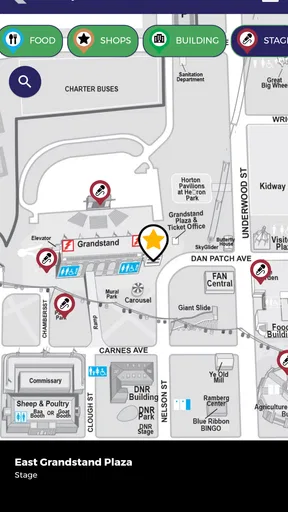
- and vendors using the fair map.
- Personalized schedules make it easier to plan your day.
- Push alerts can provide timely updates during the fair.
- Useful information works well for first-time visitors.
- Helps locate stages
- restrooms
- entrances
- and other facilities.
Cons
- Some features may be less useful outside the annual fair dates.
- Event details can change
- so displayed schedules may need checking.
- Heavy map and media use may consume battery during a full visit.
- Requires location or internet access for the best navigation experience.
- The amount of information can feel overwhelming on smaller screens.
FAQs for Official MN State Fair App
What is the Official MN State Fair App used for?
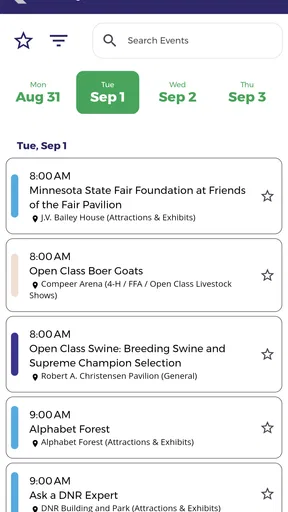
The Official MN State Fair App is designed to help visitors plan and enjoy their Minnesota State Fair experience. It typically provides access to event information, daily schedules, maps, food and shopping details, entertainment listings, exhibitor information, and other practical resources. After installing it, visitors can use their phone as a convenient guide instead of carrying printed materials around the fairgrounds.
Does the Official MN State Fair App include an interactive map?
Yes, the app is intended to help users navigate the fairgrounds with map-based information. Depending on the current version, you may be able to locate stages, buildings, food vendors, attractions, restrooms, information booths, and other important areas. It is still a good idea to review the layout before arriving, since mobile reception, battery life, or crowded conditions may affect how easily the map works onsite.
Can I use the app to find food vendors, attractions, and entertainment?
The Official MN State Fair App generally brings together information about popular fair activities, including food vendors, shopping locations, rides, exhibits, concerts, competitions, and scheduled entertainment. Search or category tools can make it easier to find something specific, while event listings help you plan your day. However, schedules and availability can change, so always check the latest information in the app or at the fair.
Does the Official MN State Fair App require an internet connection?
Some features may require mobile data or Wi-Fi, particularly updated schedules, location information, announcements, ticket-related services, or content that loads from the fair’s servers. Certain information may remain available after it has loaded, but you should not assume that every feature works offline. Before entering the fairgrounds, open the sections you need and consider taking screenshots of essential details in case connectivity is limited.
Is the Official MN State Fair App free to download and safe to use?
The official app is generally available as a free download through the appropriate Android or iOS app store, although using mobile data or purchasing fair-related products may involve separate costs. To avoid unofficial copies, confirm that the publisher is connected with the Minnesota State Fair before installing. Review requested permissions, keep the app updated, and download it only from a trusted store for the safest experience.


